AI in Practice · Teaching AI to cut my pauses without losing a syllable.
Automating my first video edit
- ☐ Cut the silences ← this part
- ☐ Clean the audio
- ☐ Make it repeatable
Every video I publish starts the same way. I record (my last session ran 44 minutes), import the file into Final Cut Pro, and settle in for the least creative job in content creation: deleting silence. The pause while I think. The pause while an AI agent thinks. The "umm, where was I" pause. Then I fix the audio, because my microphone records my voice too quietly, with a fan humming away underneath.
None of this needs talent. It needs patience, and I'd rather spend that on the parts of the video people actually watch, like the animated graphics I lay over my screen recordings to explain what's happening. So I asked a simple question: can AI do my first edit for me?
The answer turned out to be yes, but not in one prompt, and not in one article. This series follows the whole attempt, failures included. Part 1 is about the silences.
The chore, and the one question that mattered
The search started in a ChatGPT conversation about silence-removal plugins for Final Cut Pro, and ended at an open-source tool called auto-editor . Its README calls it "a command line application for automatically editing video and audio." In plain terms, it listens to your recording, finds the quiet bits, and cuts them out.
Plenty of tools do that. The question I cared about was what comes out the other end. Some tools hand you a brand-new video with the silences already removed. That sounds great until you notice a cut cost you the last syllable of a word. The cuts are baked in, and the connection to your original recording is gone.
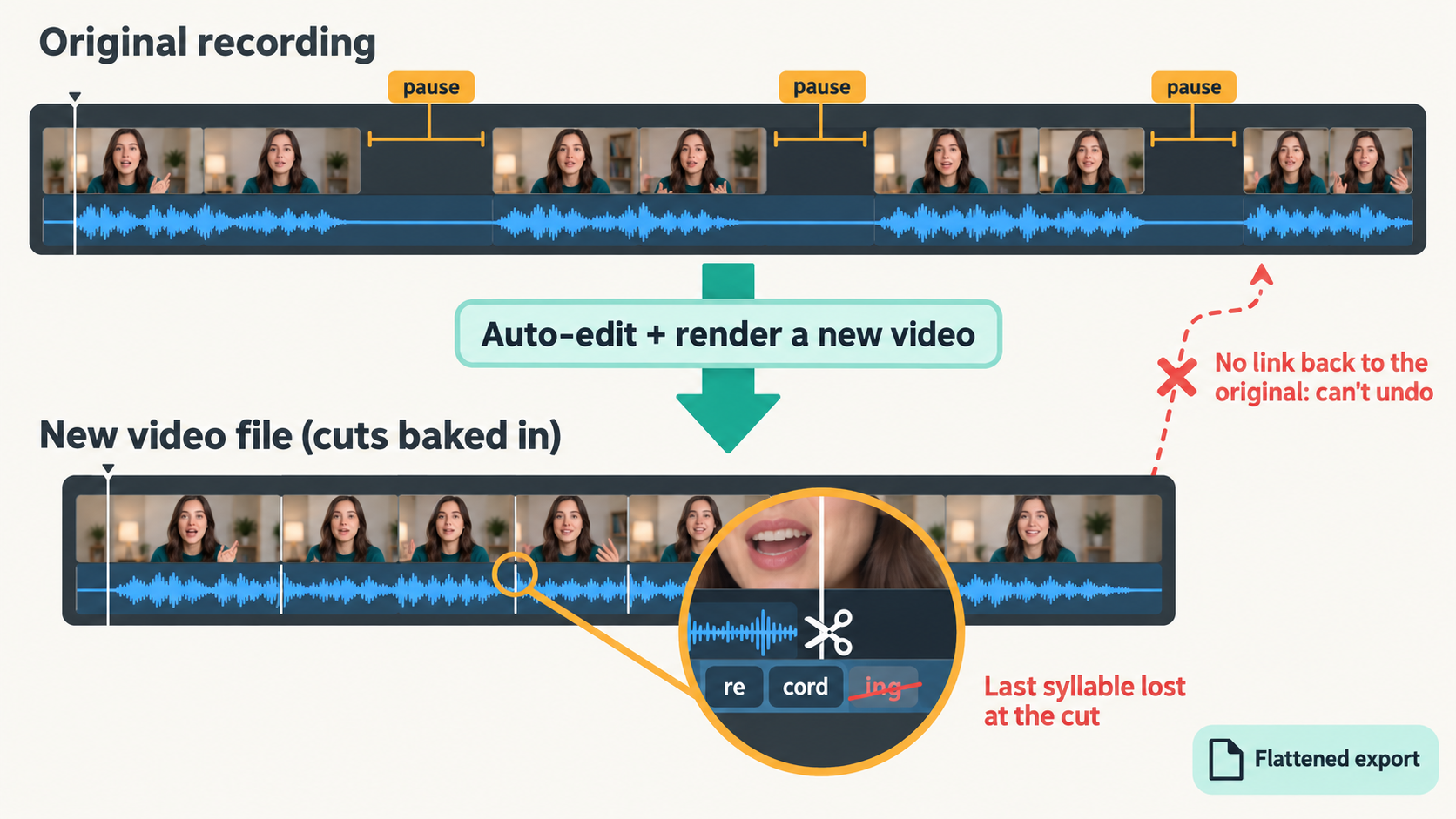
The alternative is an editable timeline. Think of the difference between a printed final copy of a document and the same document with tracked changes switched on. The printed copy is finished: if the editor deleted a sentence you needed, it's gone. The tracked-changes version still has every deletion marked, and you can reject any one of them with a click. auto-editor can export a Final Cut Pro timeline (an .fcpxml file) that works exactly like the tracked-changes version. Each kept section becomes a separate clip pointing at your original recording, so you can drag any edit back open in Final Cut.
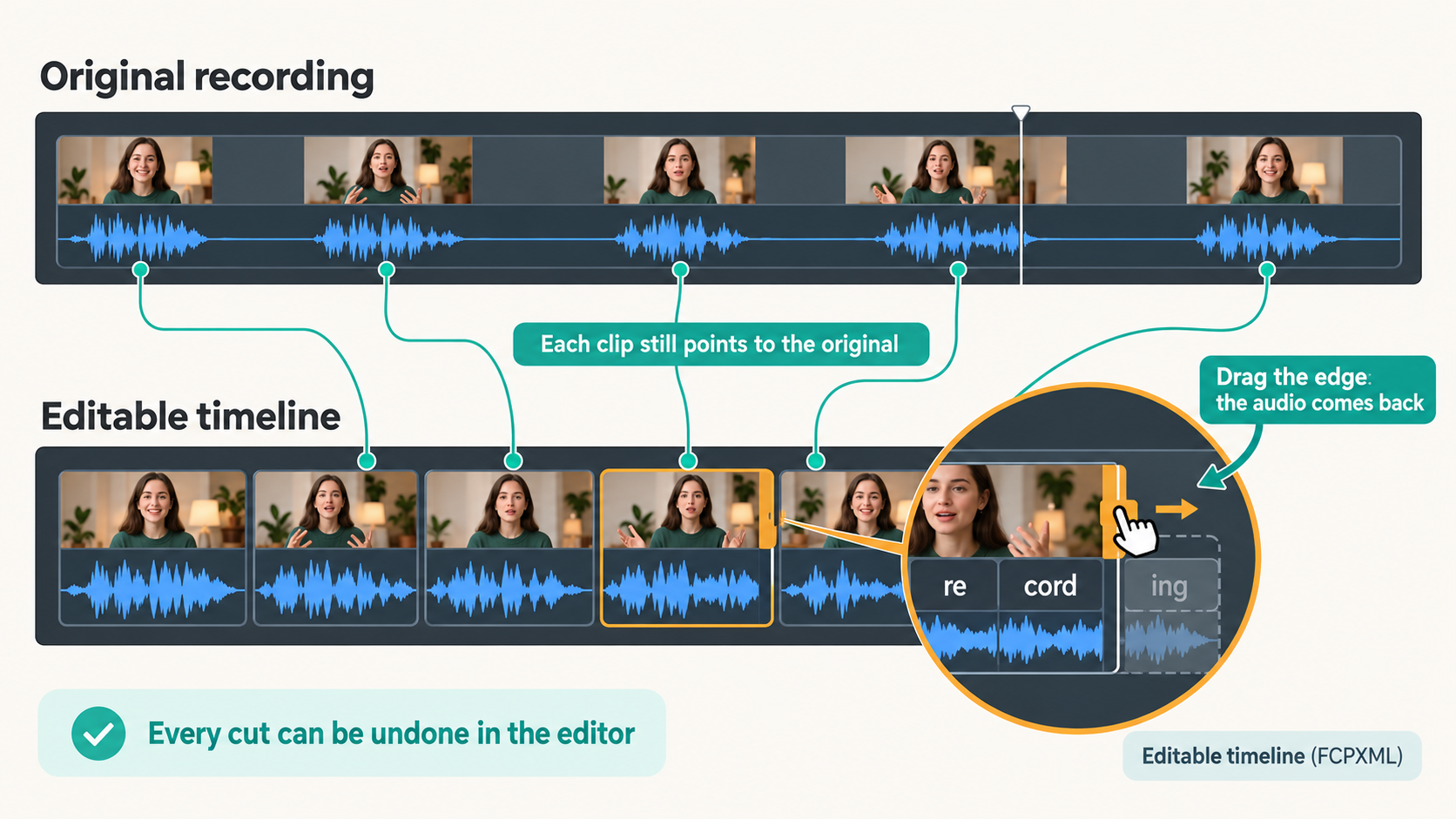
auto-editor raw.mov --export final-cut-pro --margin 0.2s,0.3s
That one line produces the timeline without re-rendering any video. The --margin part keeps a little quiet padding before and after each phrase so cuts don't feel abrupt: 0.2 seconds before, 0.3 after.
If an automation hands you a finished result you can't adjust, you've traded one chore for another: checking its work with no way to fix it.
Attempt one: the defaults chopped my words
I pointed auto-editor at a real 44-minute recording with its default settings. It cut 57% of the video into 571 clips, each about 1.4 seconds long. That isn't an edit, it's confetti. It was cutting quiet words along with the silences.
To see why, I needed to know what "quiet" means to a computer. Loudness is measured in decibels, written dB, and this is where my own intuition tripped me up, because there are two scales.
- Sound in a room counts up from silence. 0 dB is the faintest sound a person can hear, normal talking is about 60 dB and a rock concert is about 110 dB. Bigger means louder.
- Sound inside a recording counts down from a ceiling. A digital file has a hard maximum, the loudest sound it can store. That maximum is 0, and every other level is a minus number saying how far below the ceiling it sits. (Engineers write this as dBFS, "decibels relative to full scale"; most tools just say dB.)
Editing tools use the second scale. Think of depth below the sea's surface: −10 dB is just under the surface, which is loud, and −60 dB is deep down, which is very faint. auto-editor uses a threshold: anything quieter than the line counts as silence and gets cut.
When I plotted how loud each moment of my recording was, the result looked like two hills. One hill was the room's background hum, sitting around −60 dB. That level of constant background sound is called the noise floor. The other hill was my voice, around −30 dB. The default threshold sat at roughly −28 dB, right in the middle of my voice's hill. Every slightly softer word fell below the line.
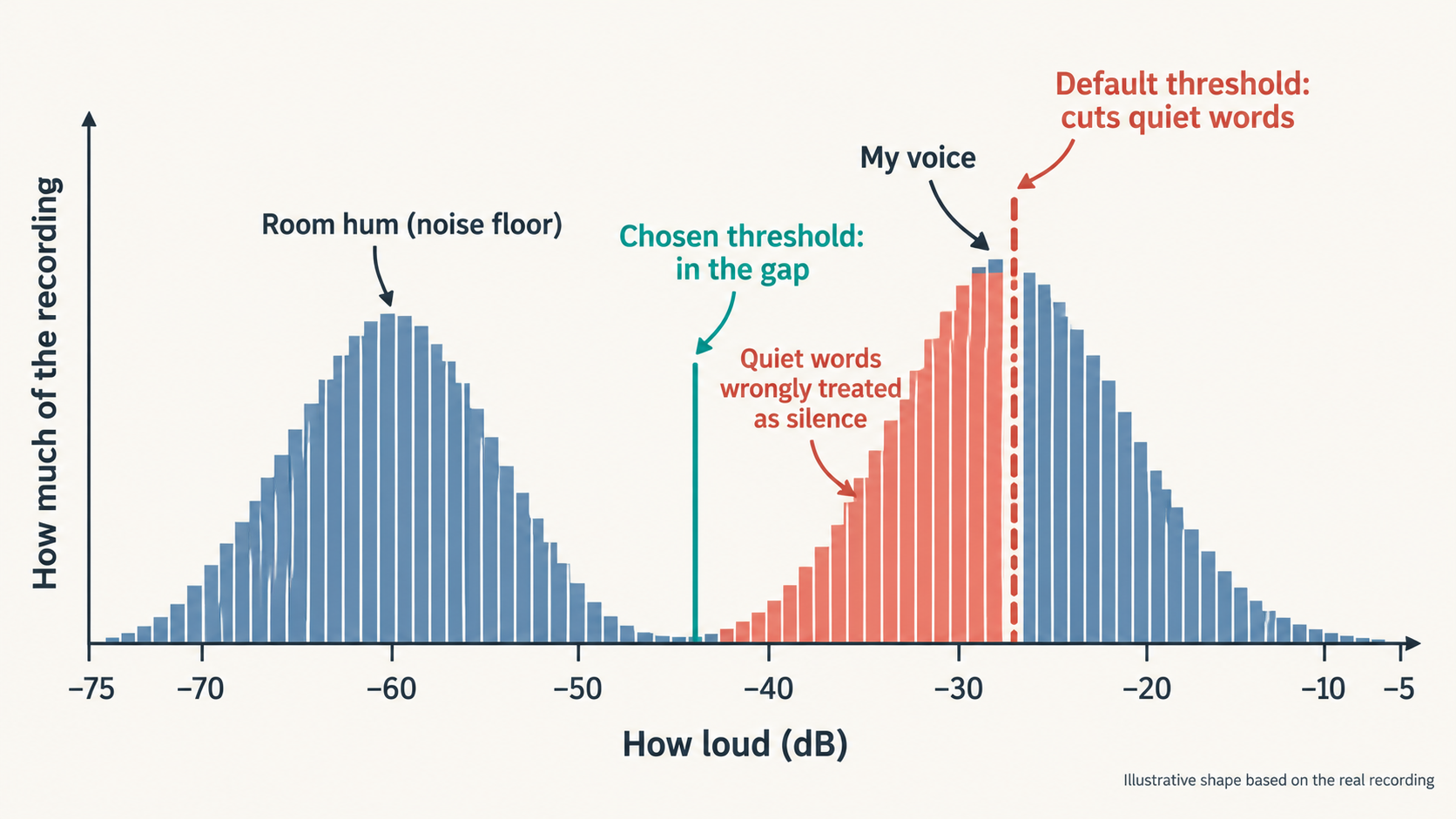
Picking a threshold is like setting a pass mark for an exam where scores bunch into two groups. If one group clusters around 30% and the other around 75%, you don't put the pass mark at 72%, which would fail half the good students. You put it in the empty gap between the groups. I moved the threshold down into the valley between the hills, around −44 dB. I also told auto-editor to ignore pauses shorter than half a second, so normal breathing between phrases stayed in.
The result was 25 minutes 52 seconds across 307 clips. I imported it into Final Cut, scrubbed through, and the edit worked well. Every cut was a real pause, and every one could still be dragged open.
Defaults are someone else's guess about your recording. Measure your own before you trust them.
Cleaner audio, tighter cuts, and a blind spot
So the cutting was automated. But my usual routine cleans the audio before any cutting: every recording goes through Final Cut Pro by hand, with Noise Removal at 50% and the volume pushed up 6 dB. So I did that as usual and fed the cleaned recording back into auto-editor. Two things changed.
First, a small surprise, and to see why it mattered you need to know where this video goes next. Video is a stack of still pictures, called frames, and my camera records 30 of them every second. After the edit, I build those animated graphics in code, with a tool called Remotion, and time each one to the frame so it pops up on the exact word it illustrates. Final Cut had quietly saved the cleaned version at 29.97 frames per second instead, an old TV standard. You'd never notice it while watching. But over 44 minutes it adds up to 2.7 seconds of drift, so a graphic timed to a word near the end would arrive late, like subtitles that fall a little further behind every minute. That set a rule for everything that followed: the frame rate must never change, and every file gets checked rather than assumed.
Second, some good news: clean audio made cutting easier. Remember the two hills, room hum and my voice? The cleanup pushed the hum down and my voice up, so the empty valley between the hills got much wider. That matters because the threshold line has to sit in that valley. When the valley is narrow, the line needs careful placing: nudge it a little too high and it starts clipping quiet words. When the valley is wide, you can put the line almost anywhere in it and get exactly the same edit. It's the difference between squeezing into a tight parking spot and parking in an empty car park.
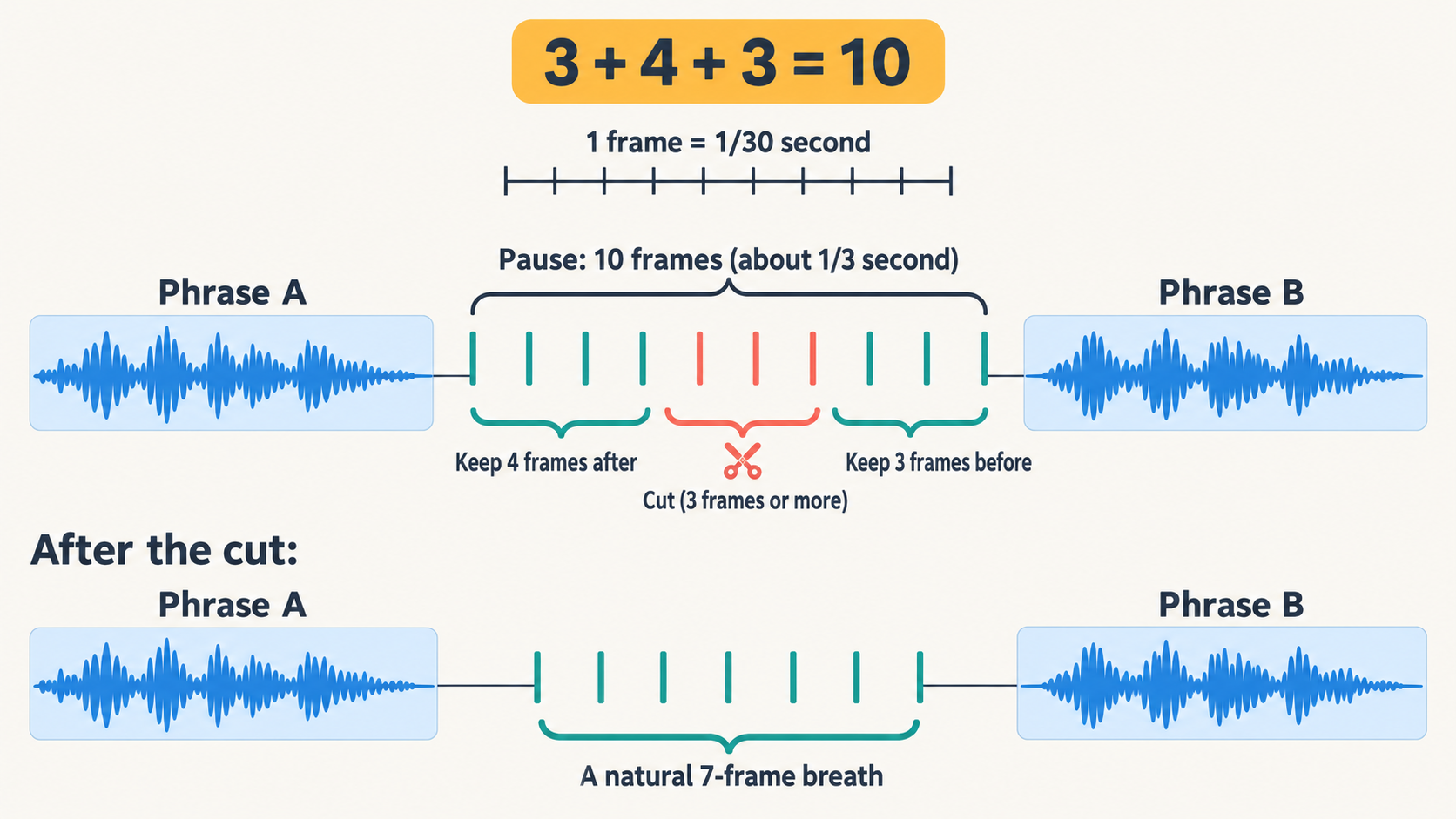
Then I got greedy. The edit still left short pauses in, and to me even a third of a second of silence felt slow. That's 10 frames. I wanted every pause that long gone, but without words crashing into each other. The rule turned out to be simple addition: keep a little breathing room after each phrase (4 frames) and before the next one (3 frames), and cut whatever's left if it's 3 frames or more. 4 + 3 + 3 = 10, so every pause of 10 frames or longer shrinks to a natural 7-frame breath.
auto-editor clean.mov -tb 30 --edit audio:threshold=0.006 --margin 3,4 --smooth 3,3 --export final-cut-pro
The 44-minute recording became 21 minutes across 701 clips, and it felt much better.
There was a catch. Because the cleanup removed keyboard and mouse sounds, sections where I was silently typing a prompt or watching an AI agent work now looked like dead air. One run quietly removed about 7.5 minutes of on-screen action. A tool that decides by listening can't see your screen.
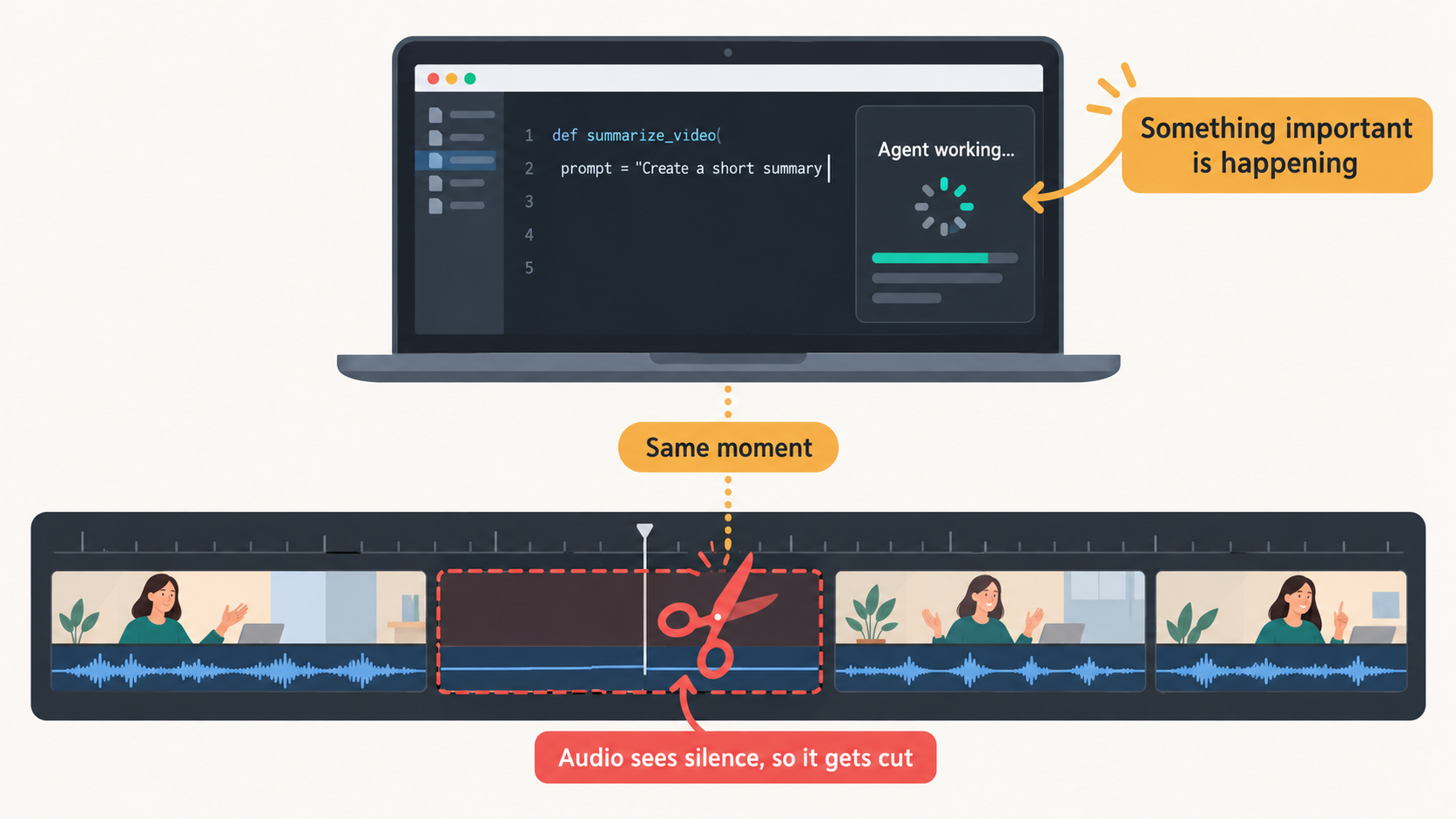
Automation needs a list of everything it removed, so your eyes can catch what its ears can't.
The half that was still mine
Look at what that tight edit was leaning on. The wide valley, the reliable threshold, the clean 10-frame cuts: all of it came from audio I had cleaned by hand first.
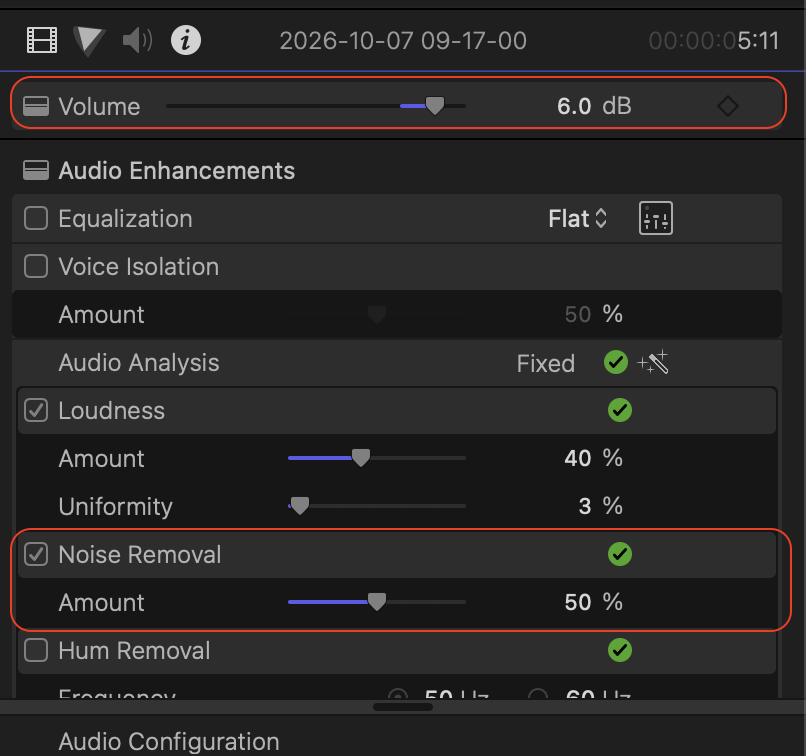
So the cutting was automatic, but every recording still began with me in Final Cut, clicking through the same settings. If an agent was going to take my whole first edit, it had to do this part too, and do it as well as Final Cut did.
That turned out to be much harder than cutting silence. My first two attempts sounded worse than Final Cut's, and the worst part was that I couldn't say why.
Rule carried forward: the frame rate must never change, and every file gets checked rather than assumed.
Next, Part 2: The Sound.My ears said "not quite", and a robot listener told me why.