AI in Practice · My ears said "not quite", and a robot listener told me why.
Automating my first video edit
- ✓ Cut the silences (Part 1)
- ☐ Clean the audio ← this part
- ☐ Make it repeatable
Every video I make starts with the same audio fix. My microphone records my voice too quietly, with a fan humming away underneath, so before I edit anything I open Final Cut Pro, switch on Noise Removal at 50%, push the volume up 6 dB and export. It works, and it sounds good. It's also a chore I repeat on every single recording.
So I wanted an AI agent to do it for me, with free tools, on one condition: the result had to sound as good as Final Cut's, to my ears. That sounds like a simple bar. It turned out to be the hardest part of automating my video edit, and it taught me what to do when you can hear that something's wrong but can't say what.
Previously
- In Part 1: Silences an open-source tool called auto-editor now cuts the pauses out of my recordings, as a timeline I can still adjust in Final Cut Pro. But the best cuts depended on audio I'd already cleaned by hand.
- Rule carried forward: the frame rate must never change. My animated graphics are timed to the exact frame of the word they illustrate, so anything that shifts the picture or the sound, even slightly, pushes them out of step.
Setting the bar
First question: what would the agent actually use? It can't sit in Final Cut clicking through settings for me. It needed a tool it could run on its own, as typed commands. The obvious choice was FFmpeg , a free command-line toolkit for audio and video that has been around for over two decades and powers a lot of video software behind the scenes. It has noise reducers, volume controls and loudness meters: everything Final Cut's recipe does, just without the buttons.
I wanted the result to be as good as Final Cut's, so I made a 46-second test clip and cleaned it in Final Cut myself, with my usual recipe. That gave me something to compare against, side by side, every time. The first two attempts didn't measure up.
Two attempts my ears rejected
Version 1 stacked two of FFmpeg's noise reducers on top of each other. My verdict after listening: "clean-fcp sounds more studio quality and smooth, clean-ff lacks that level of finesse, bit rough on the ear." My ears knew it was worse but couldn't say how, so we turned to the data. The agent measured my version and Final Cut's side by side, using FFmpeg's built-in meters plus a little analysis code it wrote on the spot. The same tool that had made the audio became the magnifying glass for inspecting it. The numbers found three problems that Final Cut's version didn't have:
- Low rumble stayed in. Final Cut trims the deep rumble below a voice; version 1 barely touched it.
- The voice lost its crispness. The noise reducers had shaved off the high frequencies: the "s", "t" and "f" sounds that make speech sound clear.
- Background noise was audible between words, 12 to 18 dB louder than in Final Cut's version.
Two quieter failures turned up as well. The sound arrived about one frame behind the picture, because the noise reducer needs a split second to listen before it acts. One frame sounds harmless, but it's exactly the kind of slip that puts lips and graphics out of step with the words. And my first build came out too loud: my microphone records on one channel, and copying it to both the left and right speakers made the loudness meter count my voice twice. Both were fixable. Both would have been invisible without checking.
Version 2 split the sound into three pitch ranges, like the bass, mid and treble knobs on a stereo, and treated each one separately. It cleaned the low and middle ranges and deliberately left the highs untouched to keep the voice crisp. It also added an expander, which turns the volume down in the gaps between words. My verdict: "very minute difference... definitely better than previous, but still not as good as FCP. But I won't be able to pinpoint what exactly it is."
That sentence was the real problem. I was the judge, and I couldn't explain my own ruling.
If you can hear that something is wrong but can't describe it, you can't fix it. You need a way to name the problem.
Hiring a robot listener (after checking its hearing)
It turns out people have already built "robot listeners" for exactly this. Here's how they work. Researchers played thousands of speech recordings to real people and asked each person to rate what they heard from 1 (bad) to 5 (excellent). Then they trained an AI model on all those ratings, until it could predict the score people would give. Now you can hand it a recording and get back the rating a room full of listeners would probably give it.
Two things make this useful for me. These models are free to download and run, so an agent can use them like any other tool. And they don't need a perfect "original" to compare against. They judge a recording on its own, the way a listener would. I tried two of them.
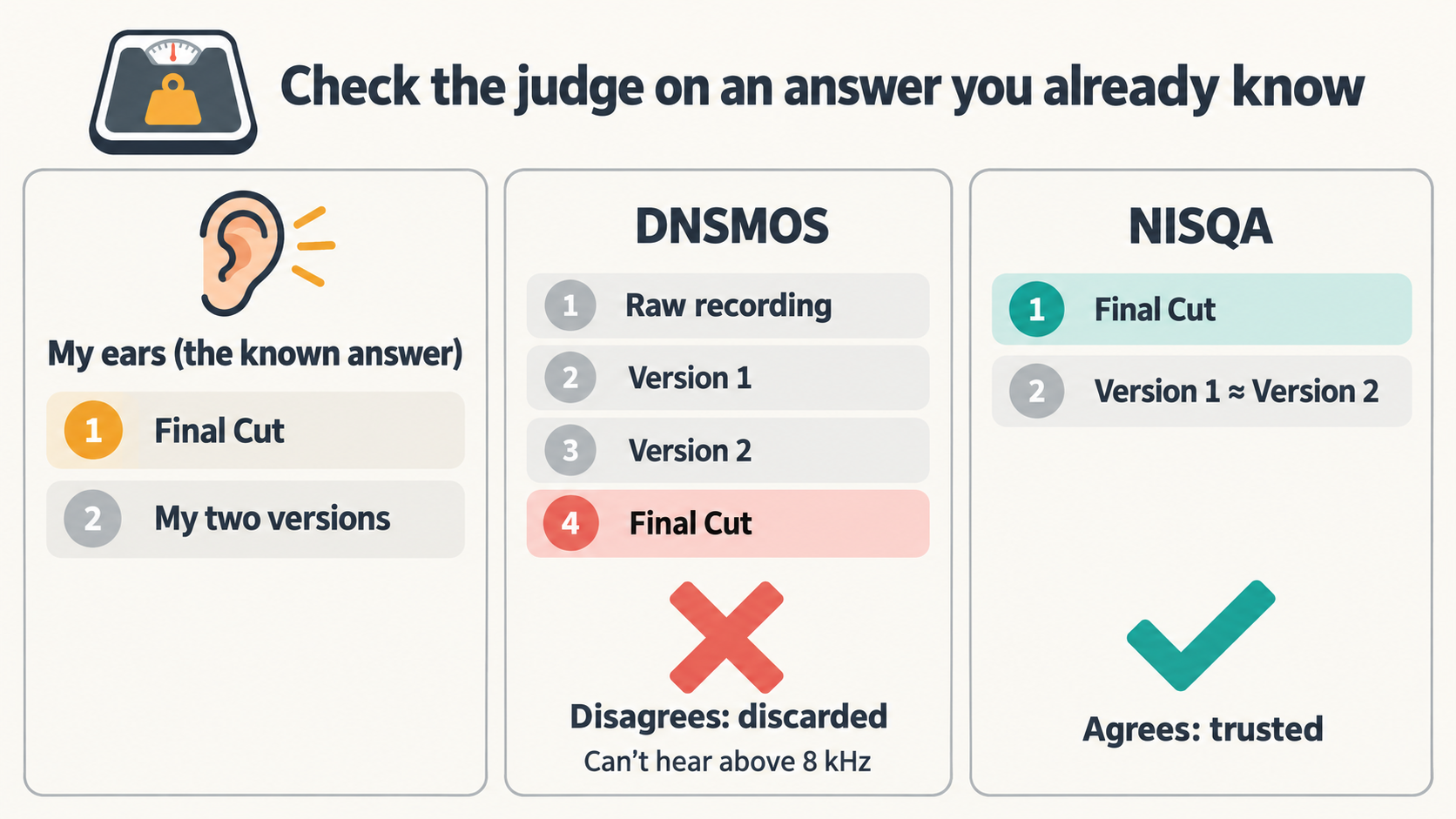
Before trusting either one, I gave them a test I already knew the answer to. I knew Final Cut's version sounded better than both of mine. If a tool scored mine higher, it was wrong, and I couldn't trust it with anything else. It's like checking a new scale with a 1 kg bag of sugar before you weigh anything that matters.
What I needed was a judge that hears what I hear, and can then tell me why.
The first candidate was Microsoft's DNSMOS . The name joins two abbreviations: DNS, for Deep Noise Suppression (noise removal done by AI), and MOS, for Mean Opinion Score (the average 1-to-5 rating from a group of listeners). Microsoft built it to grade noise-removal tools, so it looked like a perfect fit.
It got the test badly wrong. It rated my raw, uncleaned recording as the best of the lot and Final Cut's version as the worst, the exact opposite of what I could hear. The reason turned out to be simple. Before scoring, it converts the audio to a lower quality that throws away the highest pitches (anything above 8 kHz). That's exactly where the hiss and the crispness live, the very things I needed judged. It was like judging a photo's sharpness from a blurry thumbnail. DNSMOS was out.
The second candidate was NISQA , from researchers at TU Berlin, a technical university in Germany. The name is short for Non-Intrusive Speech Quality Assessment. "Non-intrusive" just means it judges a recording on its own, with no clean original to compare against.
NISQA passed. It put Final Cut's version clearly on top, just as my ears did. It even rated my two versions as almost a tie, which matched how tiny the improvement had sounded to me. Now I had a judge that agreed with my ears. That mattered, because it could do the one thing my ears couldn't: explain the difference.
Better still, it doesn't give just one overall score. On the same 1-to-5 scale, it also rates noisiness, coloration (tone), discontinuity (glitches and choppiness) and loudness separately. It named what I couldn't:
| (higher is better) | Overall | Noisiness | Tone | Discontinuity | Loudness |
|---|---|---|---|---|---|
| Final Cut (my reference) | 2.94 | 4.12 | 3.19 | 3.41 | 3.84 |
| FFmpeg version 2 | 2.10 | 3.47 | 3.01 | 2.73 | 3.85 |
Loudness matched, which agreed with my ears. Tone was close. The real gaps were discontinuity and noisiness.
Naming the "rough"
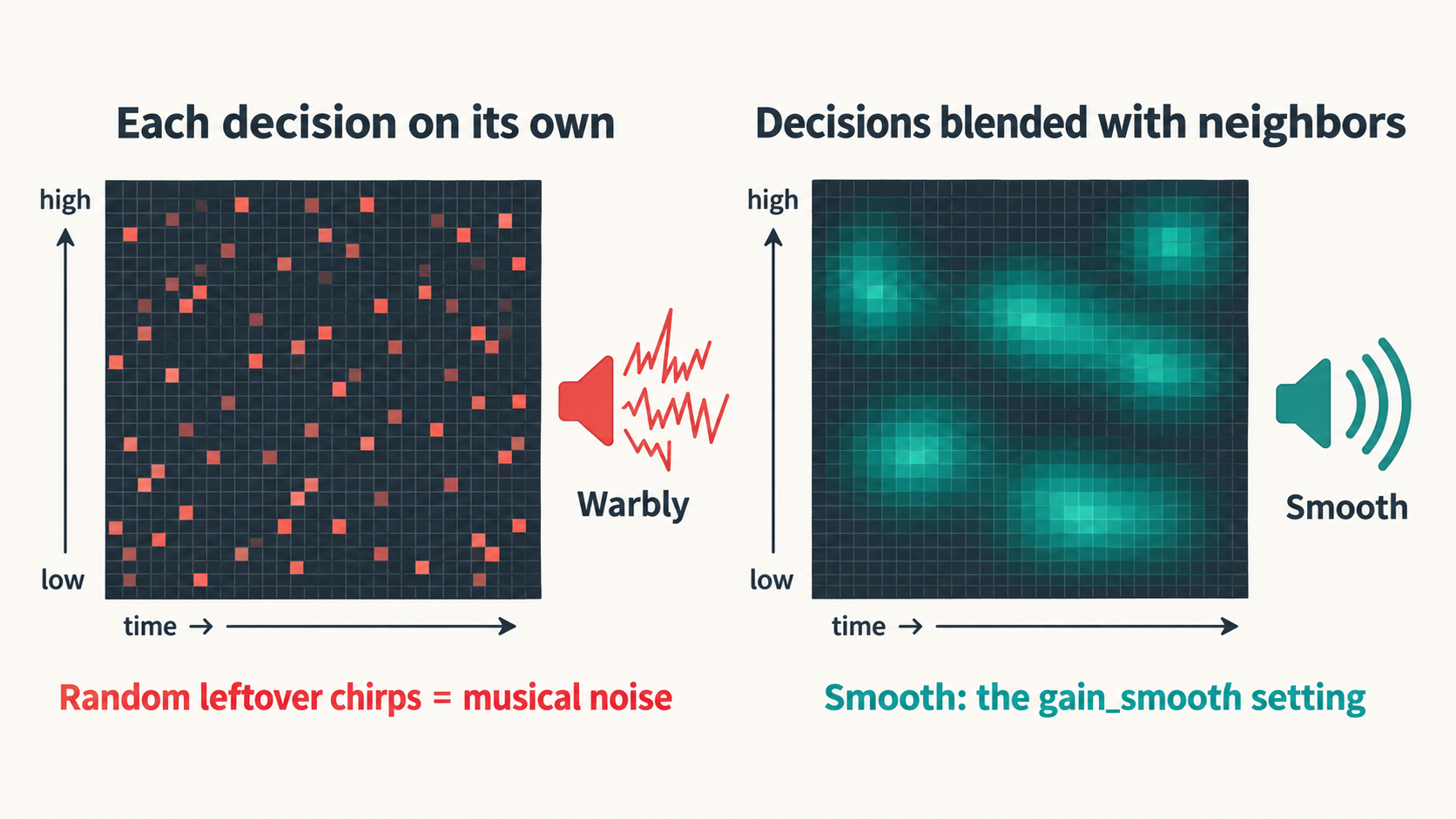
To find the cause, we turned off one processing step at a time and rescored after each change. The noise reducer turned out to be the culprit. When it decides what's noise, it makes thousands of tiny keep-or-cut decisions per second, separately for each pitch. With nothing smoothing those decisions, the leftover noise turns into faint, watery chirps that flicker in and out. Audio engineers call this musical noise, and it was the "rough" I couldn't name. FFmpeg's noise reducer has a setting called gain_smooth that blends each decision with its neighbours. It's off by default. Switching it on lifted the overall score from 2.10 to 2.61.
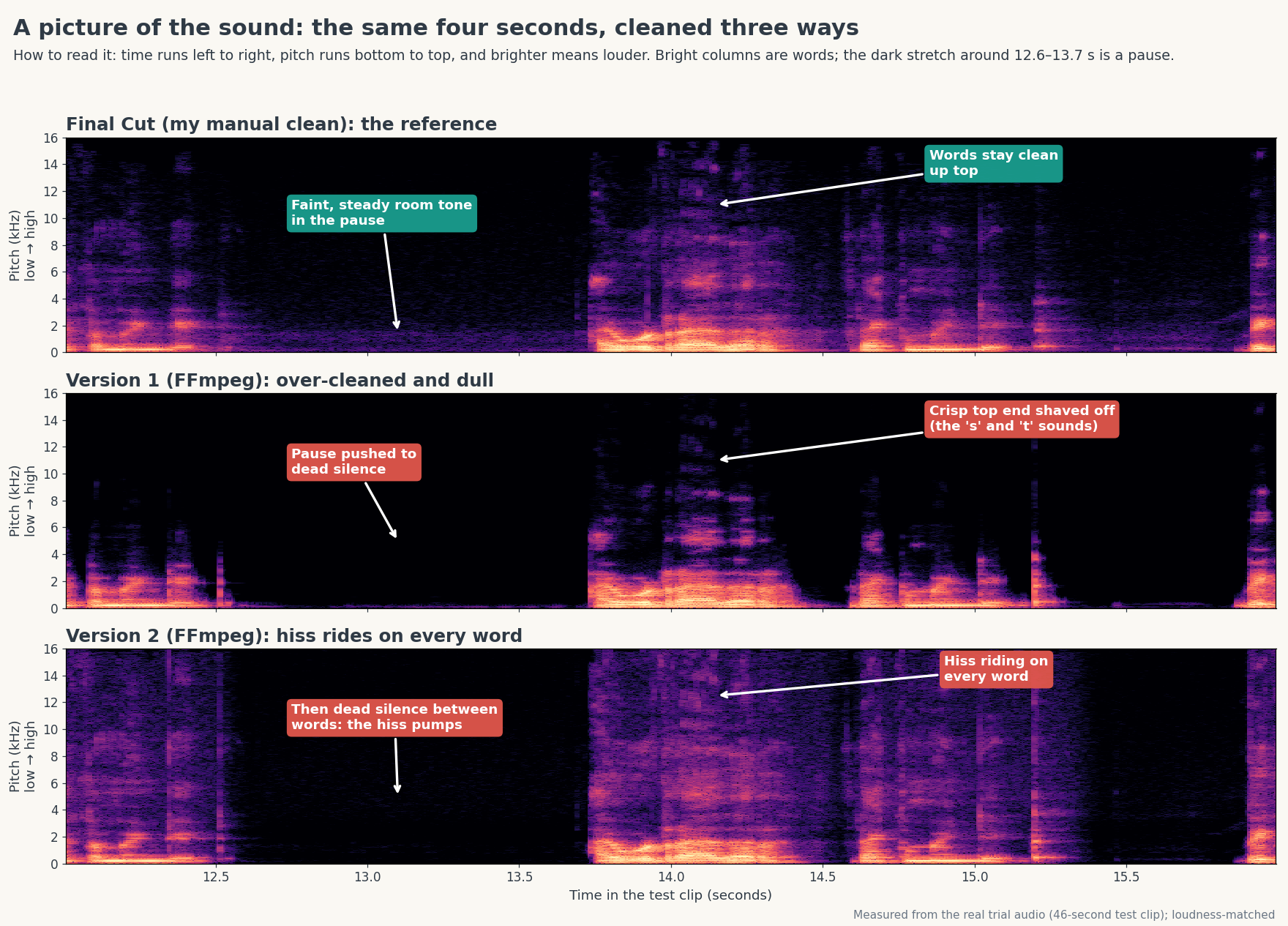
Switching on smoothing closed a good chunk of the gap, but not all of it: 2.61 against Final Cut's 2.94. To find what was left, we looked at a picture of the sound, called a spectrogram. Think of it as a heat map: time runs left to right, pitch runs from low at the bottom to high at the top, and the brighter a spot, the louder that pitch is at that moment. Words show up as bright columns, and pauses are the dark stretches between them.
The picture below shows the same four seconds cleaned three ways. Look at the top half of each strip, where hiss and the crisp "s" and "t" sounds live:
- Final Cut keeps a faint, steady haze running right through, even in the pause. Your ear hears that as a calm, natural room.
- Version 1 is dark almost everywhere up top. It scrubbed away the hiss, but took the crisp "s" and "t" sounds with it. That was the dullness.
- Version 2 lights up with hiss on every word, then goes pure black in the pause. I'd left the high pitches untouched to keep the voice crisp, so the original hiss came along with every word, and the expander, the automatic volume knob that turns the sound down whenever I stop talking, then silenced every gap.
So in version 2 the hiss switched on with each word and off between them. That flicker is called pumping. Your brain hears it as "unpolished" long before it can explain why, and it was the last piece of the "rough" I couldn't name.
An automated judge earns trust only after it agrees with you on a case you already know.
Version 3: the headphone test
Version 3 followed the evidence. It used the smoothed noise reducer on all three pitch ranges, with a gentle touch on the highs so the "s" sounds survive. It dropped the expander, so the room's faint background stays steady instead of pumping. It also shifts the cleaned sound back by exactly the noise reducer's delay, so voice and picture line up to the frame. And it never re-saves the picture at all: it cleans only the sound and copies the video across untouched, so the frame rate can't change the way Final Cut's export did.
| (higher is better) | Overall | Noisiness | Tone | Discontinuity | Loudness |
|---|---|---|---|---|---|
| Final Cut | 2.94 | 4.12 | 3.19 | 3.41 | 3.84 |
| FFmpeg version 3 | 2.86 | 4.05 | 3.19 | 3.18 | 3.85 |
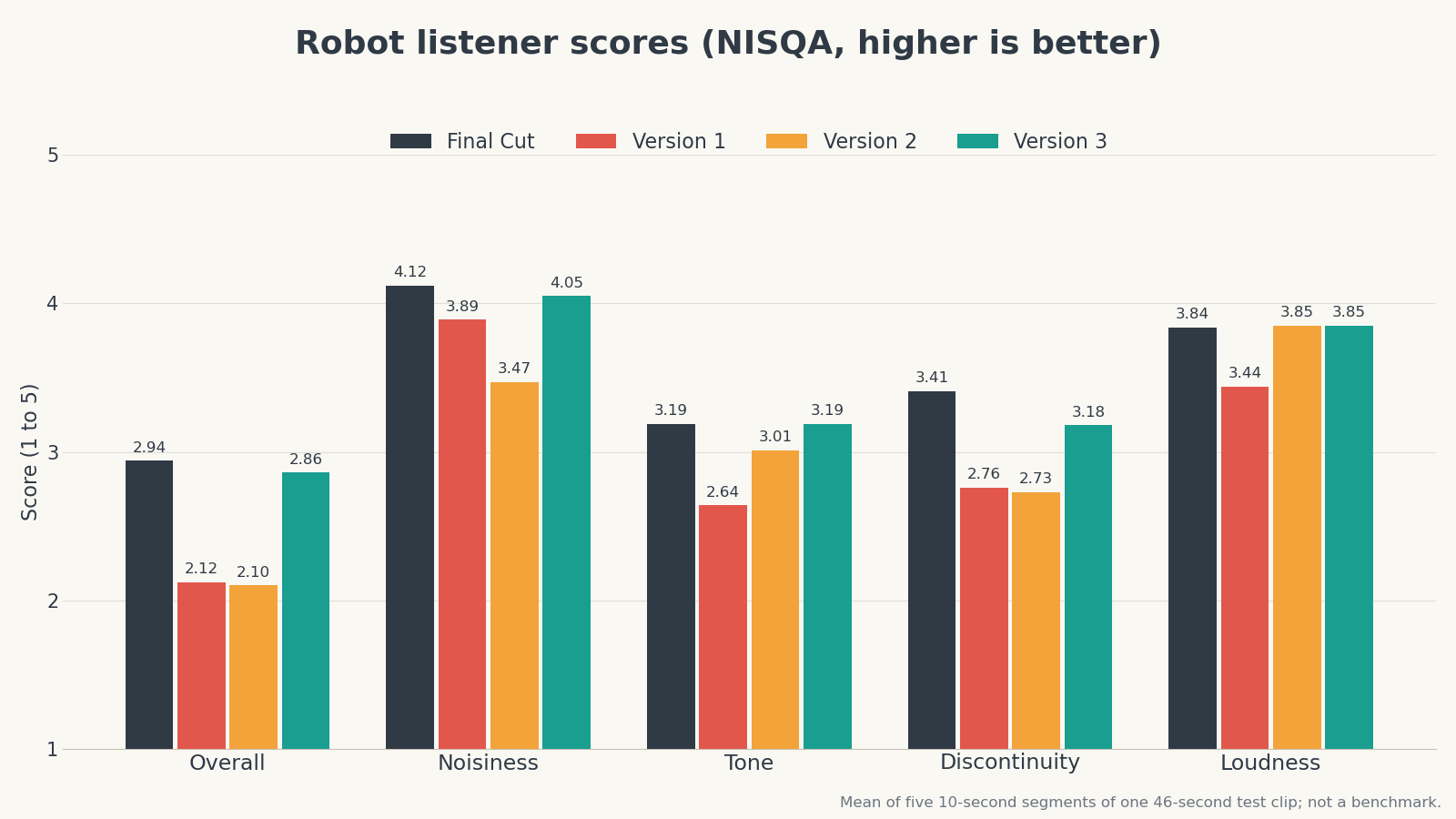
The overall gap shrank from 0.84 to 0.08, smaller than the score's natural wobble between segments of the same recording. The real test was mine, though. I listened on noise-cancelling headphones and couldn't tell the two apart.
The audio half of the chore was finally automatable, and it sounded like my own Final Cut cleanup.
Two cracks
I was ready to call it done. Then I cut the cleaned test clip into a timeline, opened it in Final Cut, and found three tiny clips sitting there that had no business being in it.
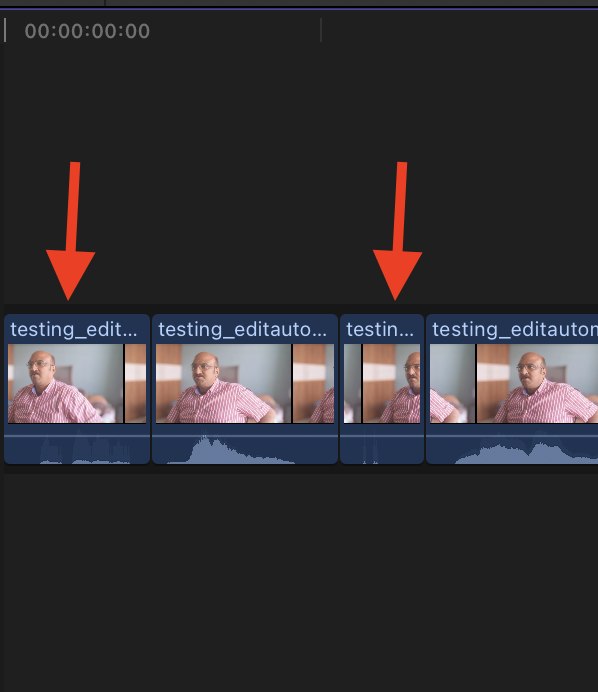
A bigger problem was hiding behind that small one. Everything that worked, every setting, every check and every lesson from both parts so far, lived in three days of chat history with an AI agent. The next time I recorded a video, would the agent remember any of it?
Rule carried forward: check any new judge, human or robot, against an answer you already know before you trust it.
Next, Part 3: The Skill - The last fix, and turning a chat experiment into something my AI can run on every recording.
Sources
- Auto-Editor (WyattBlue, GitHub)
- FFmpeg (FFmpeg project, GitHub mirror)
- FFmpeg Filters Documentation: afftdn (FFmpeg project)
- NISQA: A Deep CNN-Self-Attention Model for Multidimensional Speech Quality Prediction with Crowdsourced Datasets (Mittag, Naderi, Chehadi, Möller, 2021)
- NISQA repository (Gabriel Mittag, GitHub)
- DNSMOS P.835: A Non-Intrusive Perceptual Objective Speech Quality Metric to Evaluate Noise Suppressors (Reddy, Gopal, Cutler, 2022)
- Microsoft DNS-Challenge repository: DNSMOS (Microsoft, GitHub)
- ITU-R BS.1770-5: Algorithms to measure audio programme loudness and true-peak audio level (ITU, 2023)